
2005-12-06 22:24:37 by: h4x0r
Linux中巧妙安装红旗紫光输入法
Linux中巧妙安装红旗紫光输入法
可以下载标准版或者for Magic Linux的版本,实际上,for Magic Linux的版本也可以在RH 9下使用。
然后,运行
rpm -ivh rf-xim-input-5.0-43.i386.rpm --nodep
rpm -ivh ctrlpanel-1.5.5.rpm --nodep
进行输入法安装。然后:
cd /etc/X11/xinit/xinitrc.d/
mv /etc/profile.d/rfinput.sh xinput
然后修改xinput末尾的
# rfinput ; rfdock
为
rfinput #; rfdock
再打开/usr/local/rfinput/conf/.rfinput(或~/.rfinput/.rfinnput)文件,找到其中含GB的那一行,改成下面这样:
GBFontSet "8x16,-*-simsun-medium-r-normal--16-*-*-*-c-*-*-*,-*-r-*"
这样就能输入gbk汉字了。
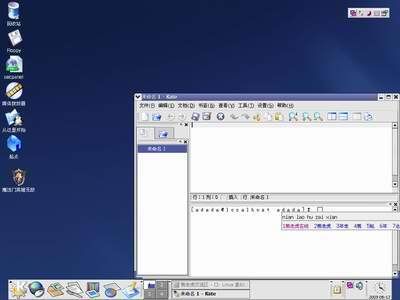
下面是我安装此输入法后的截图:
 Comments Feed: http://www.4evil.org/feed.asp?q=comment&id=290
可以下载标准版或者for Magic Linux的版本,实际上,for Magic Linux的版本也可以在RH 9下使用。
然后,运行
rpm -ivh rf-xim-input-5.0-43.i386.rpm --nodep
rpm -ivh ctrlpanel-1.5.5.rpm --nodep
进行输入法安装。然后:
cd /etc/X11/xinit/xinitrc.d/
mv /etc/profile.d/rfinput.sh xinput
然后修改xinput末尾的
# rfinput ; rfdock
为
rfinput #; rfdock
再打开/usr/local/rfinput/conf/.rfinput(或~/.rfinput/.rfinnput)文件,找到其中含GB的那一行,改成下面这样:
GBFontSet "8x16,-*-simsun-medium-r-normal--16-*-*-*-c-*-*-*,-*-r-*"
这样就能输入gbk汉字了。
下面是我安装此输入法后的截图:
[Last Modified By h4x0r, at 2005-12-06 22:27:11]
Comments Feed: http://www.4evil.org/feed.asp?q=comment&id=290
There is no comment on this article.


